
Alaska Distance Classic
When is Alaska Distance Classic?
Alaska Distance Classic takes place on Saturday, August 1, 2026 in Anchorage, AK.
What distances does Alaska Distance Classic offer?
Alaska Distance Classic offers 6 events: In-Person 5K, Virtual 5K, In-Person 10K, Virtual 10K, In-Person 5K/10K Double-Up, Virtual 5K/10K Double-Up.
| Event | Distance | Price | |
|---|---|---|---|
| In-Person 5K | 5.0 km | $37.00 | Register |
| Virtual 5K | 5.0 km | $37.00 | Register |
| In-Person 10K | 10.0 km | $42.00 | Register |
| Virtual 10K | 10.0 km | $42.00 | Register |
| In-Person 5K/10K Double-Up | 15.0 km | $47.00 | Register |
| Virtual 5K/10K Double-Up | 15.0 km | $47.00 | Register |
How much does Alaska Distance Classic cost?
Registration for Alaska Distance Classic starts at $37.00. Prices vary by event distance.
Where is Alaska Distance Classic held?
Alaska Distance Classic is held in Anchorage, AK at 4455 University Dr.
About Alaska Distance Classic
Run 5k, 10k, or Double-Up!
Run a 5K, 10K or BOTH at the Alaska Distance Classic! Double-Up finishers earn a special reward. Sticking with the 5K or 10K? No worries, we have special rewards for you too. Root beer floats, anyone?
The Alaska Distance Classic starts at APU! Is 10K too far? Join us for a 5K. Is 10K not far enough? Sign up for the Double-Up. You can run both the 5K and the 10K and earn yourself a special finisher award!
The 5K will start 45 minutes before the 10K. So if you plan on doubling up you have 45 minutes to finish the 5K and hit the 10K Start line. Take a lap through the beautiful woods that surround the University of Alaska and Alaska Pacific University campuses.
In tradition with previous years, this event includes awareness and a fundraiser for Special Olympics Alaska. Thank YOU for helping us support this incredible community organization. We look forward to partnering again and highlighting the world-class athletes from SOA, especially in an Olympic year!
FAQs
How to Guides
How to Select Starting Period
* Let us know when you will be showing up to start your event. This will be an open start format, and you can start your event anytime in this 30 minute window.
* Remember, if you are doing the Double Up, you need to start each event before 12pm. You only need to select a period for your first start.
Step 1: You will need to follow this link to log into your RunSignup account, https://runsignup.com/Profile
Step 2: In your Upcoming Events find the Alaska Distance Classic and select "Manage Registration".

Step 3: You will be brought to your Alaska Distance Classic Registration information page. Here you will select "Starting Period" in the above menu bar.
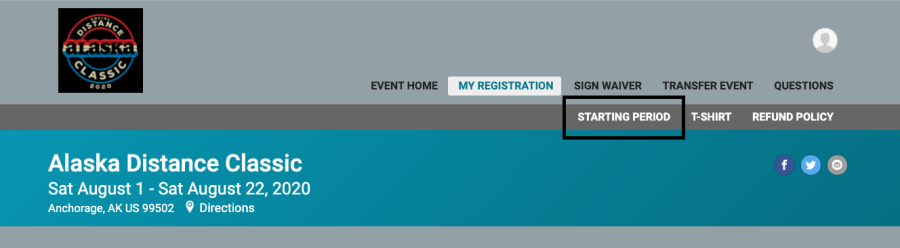
Step 4: You will be brought to the 'Starting Period' page. You can then select the Time Range for when you want to start. Select your time range.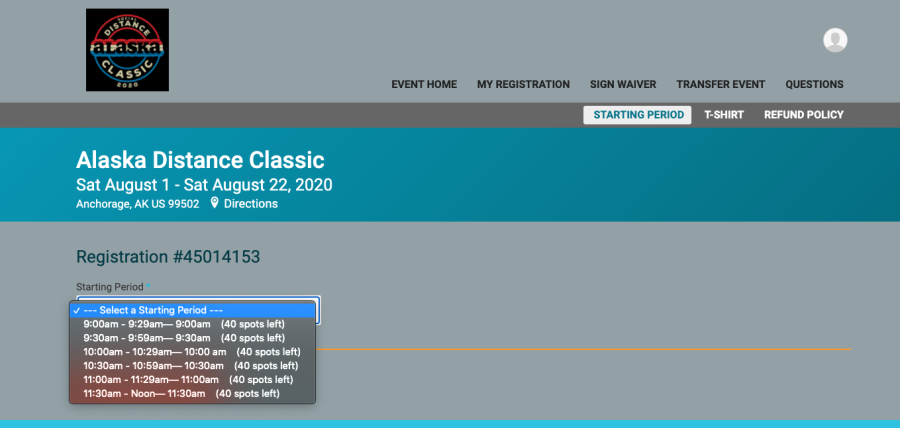
Step 5: After selecting your Starting Period, select 'Save'. You will be all set to go! 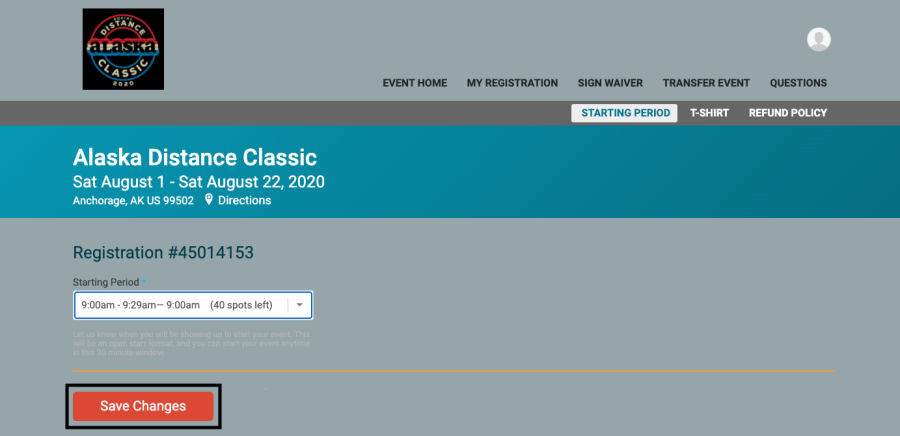
* We are asking for this information so we can control the group sizes that will be gather to start the 2020 Alaska Distance Classic. This is just letting us know when you will be showing up to start your event. This will be an open start format, and you can start your event anytime in this 30 minute window.
How to Transfer Events
Step 1:
You will need to follow this link to log into your RunSignup account, https://runsignup.com/Profile
Step 2:
In your Upcoming Events find the Alaska Distance Classic and select "Manage Registration".
Step 3:
You will be brought to your Alaska Distance Classic Registration information page. Here you will select "Transfer Event" in the above menu bar.
Step 4:
Once you are at the Transfer Event page, you will then select "Start Transfer".
Step 5:
You will then be brought back to the registration page, and you will proceed through the registration process. Making sure to select either the In-Person 5K, 10K, or Double-Up. Then you will go through the registration process as you did when you first registered.
Transferring from the Virtual 5K to the In-Person 5K, the Virtual 10K to the In-Person 5K, In-Person 10K, or the Virtual Double Up to the any of the In-Person events will be free. If you move from a shorter distance to a longer distance, you will be charged the difference in registration price.
Step 6:
You will be guided through a new waiver and specific registration questions regarding the In-Person event!
Once you get to the final page you will hit "Complete Registration". After you have selected "Complete Registration" you have successfully transferred your event, CONGRATS!
We are excited that we are able to put on an In-Person event for you! Please stay tuned for any further information regarding the event in the coming weeks!
How To Upload Virtual Results
There are two ways to upload your results!
1) You can upload your results Manually:
- Navigate to the Results Page, HERE!
- Select, SUBMIT VIRTUAL RESULTS
- Search for your registration by First & Last Name OR Email & Birth Date
- Select, SUBMIT VIRTUAL RESULTS
- Enter your time manually or by uploading a .TIF or .GPX file.
OR
- You will need to follow this link to log into your RunSignup account, https://runsignup.com/Profile
- Select SUBMIT VIRTUAL RESULTS
- Then you can enter your time, and hit SUBMIT YOUR TIME. You can also indicate that you finished your event with entering a time.
___________________________________________________________________________
2) You can also use the RaceJoy app. This can be downloaded on any mobile device. Here is a link with information about RaceJoy: https://www.racejoy.net/
Race Joy allows you to:
- Automatically track your progress and distance on any course you choose.
- Automatically post your results to the online event results
- Allow your family and friends to track your progress and send you cheers.
- Hear GPS progress alerts and pre-set cheers as you complete along your route
Update Shipping Address
Step 1:
You will need to follow this link to log into your RunSignup account, https://runsignup.com/Profile
Step 2:
In your Upcoming Events find the Alaska Distance Classic and select "Manage Registration".
Step 3:
You will be brought to your Alaska Distance Classic Registration information page. Here you will select "Shipping" in the above menu bar.
Step 4:
You can then enter or update your shipping address, then select 'Update Address'.
Update T-Shirt Size
Step 1:
You will need to follow this link to log into your RunSignup account, https://runsignup.com/Profile
Step 2:
In your Upcoming Events find the Alaska Distance Classic and select "Manage Registration".
Step 3:
You will be brought to your Alaska Distance Classic Registration information page. Here you will select "T-Shirt" in the above menu bar.
Step 4:
You will then be able to use the drop down menu to update your shirt size, and then you can select CONTINUE.
Virtual Event FAQs
FAQs
- What is a Virtual Event?
A virtual event is a walking/running event that you can complete anytime/anyplace! The best part of a virtual event is convenience you decide what works best for you.
Complete your distance(s)! You can run your favorite route on the trails, in your neighborhood, at the gym, or under the late night sunset.
- How long do I have to complete my 5K, 10K, or 5K/10K Double Up?
You will have from July 31st - August 7th, 2021 to complete your event.
- How long do I have to upload my Results?
You will have from July 31st - August 7th, 2021 to upload your results.
- How will I pick up my event packet?
For Virtual Participants there is a Question that should be answered regarding your packet pickup.
Log into your RunSignup profile, and select 'Manage Registration' next to the Alaska Distance Classic. Then you will select 'Questions' from the menu on the next screen.
We will offer shipping for virtual participants, or you can come to our packet pickup on:
Thursday, August 5, 2021 from 4:00 pm - 6:30 pm @ Downtown Skinny Raven location
*If you are participating virtually and need your event packet mailed to you, please update your shipping registration question and confirm your shipping address. Do this by logging into your RunSignup profile, click "Manage Registration" then "Questions" and "Shipping" (Tutorial Here.)
- How do I upload my Results?
There are two ways to upload your results!
You can upload your results Manually:
- Navigate to the Results Page, HERE!
- Select, SUBMIT VIRTUAL RESULTS
- Search for your registration by First & Last Name OR Email & Birth Date
- Select, SUBMIT VIRTUAL RESULTS
- Enter your time manually or by uploading a .TIF or .GPX file.
You can also use the RaceJoy app. This can be downloaded on any mobile device. Here is a link with information about RaceJoy: https://www.racejoy.net/ Race Joy allows you to:
- Automatically track your progress and distance on any course you choose.
- Automatically post your results to the online event results
- Allow your family and friends to track your progress and send you cheers.
- Hear GPS progress alerts and pre-set cheers as you complete along your route
- Do I need to submit results?
You do not have to submit a time. You can indicate that you completed the run without providing a time.
- Do I have a bib?
Each participant will have a bib, physical bibs will be available along with virtual bibs.
Log into your RunSignup profile and view and/or download your personalized virtual bib. You will also receive a real, paper bib with registration.
- Virtual Run Safety Policy
Participants must abide by the Center for Disease Control (CDC)'s recommendations for the prevention of the spread of COVID-19 and attest to having read the CDC's guidance at: https://www.cdc.gov/coronavirus/2019-ncov/prepare/prevention.html . Participants must also follow local, state and federal regulations regarding preventing the spread of COVID-19 for their region. Participants must abide by all pedestrian safety ordinances including running on a sidewalk where available and not in the road. If there is no sidewalk or multi-use trail is available participants must run against oncoming traffic and not with traffic.
Question & Add-0n Management
Step 1:
You will need to follow this link to log into your RunSignup account, https://runsignup.com/Profile
Step 2:
In your Upcoming Events find the Alaska Distance Carry and select "Manage Registration".
Step 3:
You will be brought to your Alaska Distance Classic Registration information page. Here you will select "Questions" or "Add-ons" in the menu bar depending on what your wish to edit.