Backyard BRRR Virtual Challenge
When is Backyard BRRR Virtual Challenge?
Backyard BRRR Virtual Challenge takes place on Friday, January 1, 2027 in Anywhere, VA.
What distances does Backyard BRRR Virtual Challenge offer?
Backyard BRRR Virtual Challenge offers 1 event: Backyard BRRR Virtual Challenge.
| Event | Distance | Price | |
|---|---|---|---|
| Backyard BRRR Virtual Challenge | — | $65.00 | Register |
How much does Backyard BRRR Virtual Challenge cost?
Registration for Backyard BRRR Virtual Challenge starts at $65.00.
Where is Backyard BRRR Virtual Challenge held?
Backyard BRRR Virtual Challenge is held in Anywhere, VA at 1 Anywhere You Want Road.
About Backyard BRRR Virtual Challenge
BRRR...it's getting cold outside...so it's time again for a fun challenge to keep us all active and getting OUTSIDE! It's time for the 7th annual Backyard BRRR Virtual Challenge!
The goal of the Backyard BRRR Virtual Challenge is to accumulate at least 31 total miles in 31 outside activities during the month of January...and walking, running, cycling, paddling/rowing, swimming, and winter sports all count.
But...to make things more fun and encourage lots of adventuring during the month...you don't have to stop at 31 miles! In fact, we track both inside and outside miles and activities. Why tracking inside and outside activities? Well, we want the challenge to inspire you to be as active as possible and log as many miles as possible from January 1st to 31st! Curious how many miles participants logged last year...check out the results.
You can participate as an individual and also on a team of up to 10 people. We also have a special program for corporate partners!
A special prize will be given to the top men, women, and non-binary participants and top teams for the following accomplishments:
- Individual with the most overall total miles
- Individual with the most overall total miles outside
- Individuals with the most miles in each of the following disciplines (walking, running, cycling, skiing, swimming, paddling/rowing)
- Individual with the most pushups
- Individuals with the most miles outside in each of the following disciplines (walking, running, cycling, and paddling/rowing)
- Team with the most overall total miles
- Team with the most overall total miles outside
- Teams with the most miles in each of the following disciplines (walking, running, cycling, skiing, swimming, paddling/rowing
- Teams with the most miles outside in each of the following disciplines (walking, running, cycling)
- Corporate team with the most overall miles
- Corporate team with the most overall miles outside
Corporate Partner Program
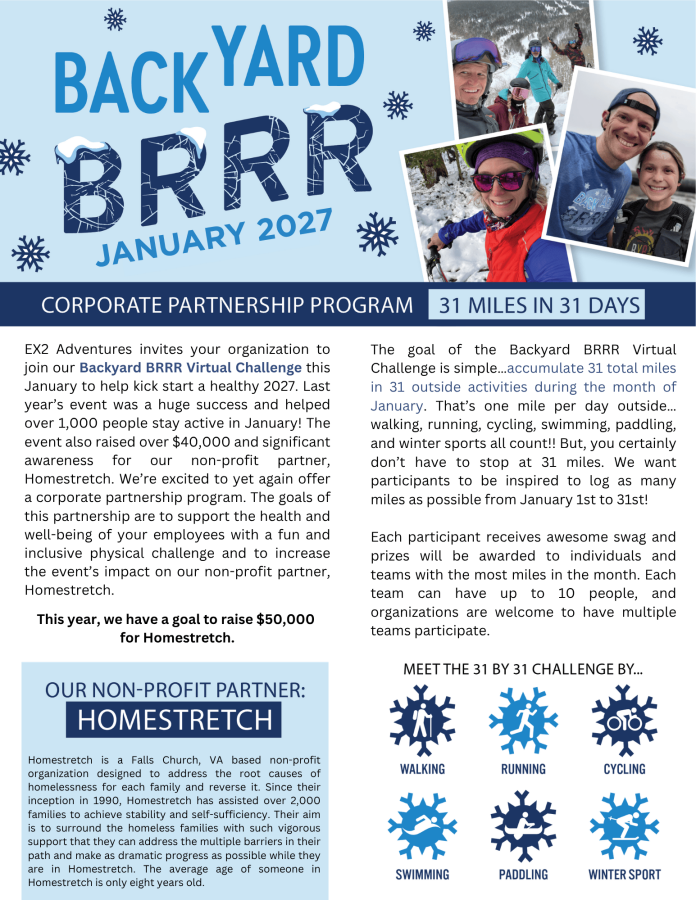
EX2 Adventures invites your organization to join our Backyard BRRR Virtual Challenge this January to help kick start a healthy 2027. Last year’s event was a huge success and helped over 1,000 people stay active in January! The event also raised over $33,000 and significant awareness for our non-profit partner, Homestretch.
Partnership Goals
The goals of this partnership program are to support the health and well-being of your employees with a fun and inclusive physical challenge and to increase the event’s impact on our non-profit partner, Homestretch. This year, we have a goal to raise $50,000 for Homestretch.
Interested in learning more?
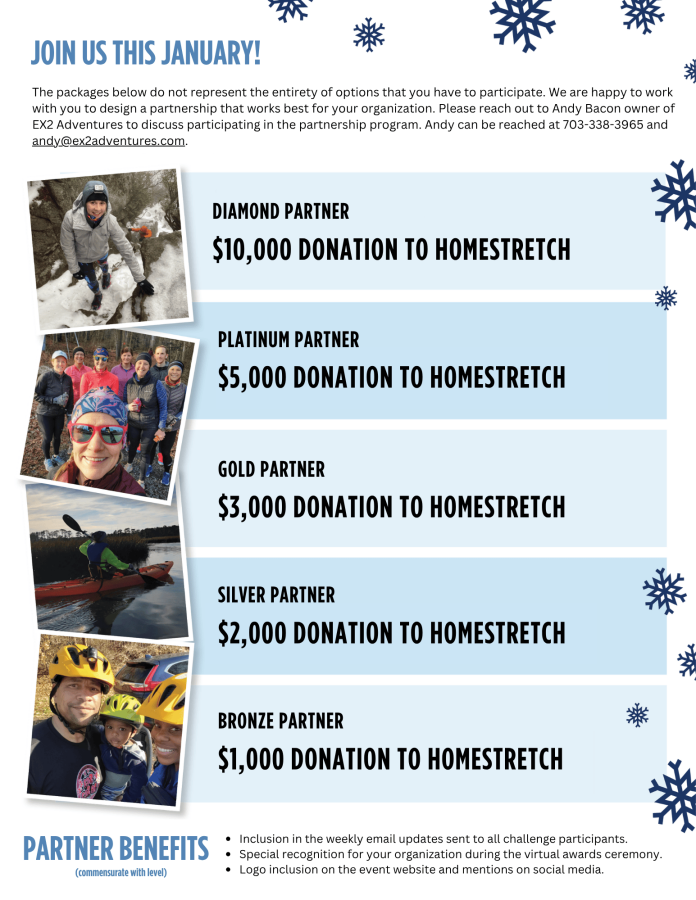
Check out the information below and the reach out to Andy Bacon, owner of EX2 Adventures, to discuss participating in the partnership program. Andy can be reached at 703-338-3965 and andy@ex2adventures.com.
Corporate Partner Program FAQs
Is my organization limited to the five partnership levels described in the information packet?
No. The levels certainly do not represent the entirety of options that you have to participate. Please reach out if you have something else in mind.
Is there a limit to the number of employees in my organization that can participate?
No. The program and virtual challenge are designed to scale and can support any number of employees...from 1 to 10,000.
My organization would like to make a significant donation, but will not have any participate. Is that OK?
Yes, of course. However, we'd love you to participate in the challenge...it's super fun!
How does my organization make the donation and pay for the challenge entries?
There are numerous options. The most common model is for the organization to submit their donation directly to Homestretch. EX2 will provide a detailed invoice with instructions to all participating organizations.
How do my employees register for the challenge?
Once an organization joins the corporate partnership program, EX2 Adventures can send the organization a unique coupon code that can be used by each participant to register if you'd like to cover their entry fee. If employees will cover their own entry fee, then they can just register themselves.
How large can each virtual challenge team be?
Each team is limited to 10 people, but organizations can form as many teams as needed.
How should our teams be named?
It's a good idea to name your teams in the following format: company name - team name. For example, MetroStar - Team Fox or MetroStar - Fox or MetroStar - 1. Having your teams pick their names is part of the fun!
How are teams managed?
Each team will have a team captain. This is typically the person that registers first and creates the team. The RunSignUp platform makes team management very easy, and we are always available to help if needed. Alternatively, EX2 Adventures can create the teams all at once and then the employee just joins their team when they register.
Are there prizes and recognition for top individuals and teams?
Yes! We will have special prizes for individuals and teams with the most miles (total miles, running miles, walking miles, swimming miles, cycling miles, and winter sports miles) during the challenge. We'll also have prizes for the most push ups! In addition, we'll have a very special recognition for the organization that contributes the most to Homestretch.
FAQS
What is the goal of the challenge?
The goal of the Backyard BRRR Virtual Challenge is to accumulate at least 31 total miles in 31 outside activities during the month of January. The basic idea is to get outside every day during the month of January.
What activities count in the challenge?
For this challenge, we ask that you only include miles accomplished via running, walking, cycling, swimming, paddling/rowing, and skiing or snowboarding. This keeps things consistent across participants.
How do I log my miles?
- Go to the Results page.
- Click Submit Virtual Results and then search for your registration.
- Click the Log Activities next to your name.
- If you aren't logged in, you can quickly verify yourself by phone number or email.
- Select the activity type and then enter the date and distance of the activity. You may also enter the time and elevation gain and a comment. Entering the time will enable the system to calculate your average pace. Entering elevation will enable the system to track you total elevation. Pretty cool huh!!
- Add a comment "outside" if your activity was outside.
In this video, I describe how to add activities (1:00) and edit activities (4:45); view results (5:40), and share photos (8:50). Note: pushup is now an activity type and you enter the number of pushups as a comment.

How do I record my activity as being outside (versus inside)?
Both inside (e,g., treadmill) and outside miles count towards your overall milage total, but special prizes will be given outside miles (see above). Remember that the purpose of the challenge is to get you outside! Besides racking up the miles, your goal is to get outside every day in January. To record an activity as being outside, simply write "outside" in the comment section for the activity.
Note: Why not write “inside” instead? Over the years, my thinking has been that this challenge is specifically designed to encourage all of us to spend more time outdoors than we might normally do. By typing that an activity was outside, it psychologically reinforces the accomplishment of choosing to be outdoors rather than indoors. Writing “inside” frames the activity as a negative, while writing “outside” reinforces it as a positive
Can I count the walking around that I do as a part of my normal day or normal work day (e.g., around the office, around the house)? How about things like walking around the grocery store when buying groceries?
It is not in the spirit of the challenge to count these miles just accomplishing your normal daily tasks. Said another way...my intent is not that you start your GPS watch and let it run all day. However, if you decided to walk 2 miles to the grocery store versus drive there, then you could certainly count those miles. You could also count a dedicated walk that you go on during the day while at work. There are endless scenarios and I ask that you use your best judgement and comply with the spirit of the event.
We just got snow...how about counting the time I shoveled snow?
You could treat it like a walk. The conversion if you didn't track actual distance is: Walking…20 minutes = 1 mile
How do I record miles when downhill skiiing and snowboarding?
Only human powered distance, elevation gain, and time should be reported...so chair lift distance, elevation gain, and time should NOT be included.
It's my understanding that Strava includes chair lift distance, elevation gain, and time in the statistics it reports for alpine skiiing...so those metrics are not valid for the challenge and need to be adjusted before reporting them.
Can I join the challenge after January 1st?
Yes. As long as the event is not sold out, you can join in the fun after January 1st.
What if I don't have a way to measure my distance?
No problem at all! If you don't have a GPS watch or other way to know your actual distance (e.g., treadmill or spin bike that captures distance), you can use this conversion information to calculate your distance based on the activity time.
Walking…20 minutes = 1 mile
Running…15 minutes = 1 mile
Cycling…10 minutes = 1 mile
Swimming...40 mins = 1 mile
Paddling/rowing…10 minutes = 1 mile
XC Skiing…10 minutes = 1 mile
Downhill Skiing…15 minutes = 1 mile
How do I record the number of pushups?
To record the number of pushups you do, select pushup as the activity type and enter the number completed in the comments section for that activity. The pushup counts will be aggregated manually once per week and sent out.
Can I edit an activity after I've entered it?
Yes! From the log activity screen, simply scroll down and you'll see your previous activities listed. Click the manage activities link and then the edit icon next to the activity that you want to change. Update the activity and save it.
Can I change my personal distance goal?
Yes! By default, I made everyone's goal 31 miles, but you can change it at any time. From the log activity screen, simply scroll down and you'll see Goals. Click the edit personal goals link and then update your personal goal.
I just logged some miles...why aren't the results updated?
It takes a few minutes for the results to update after you enter in a new activity.
How many people can be on a team?
Up to 10 people can be on a team.
Can I participate in the challenge on a team with my co-workers?
Yes, absolutely!! In fact, we have an awesome Corporate Partnership Program.
How do I create or join a team during registration?
During registration, you will be asked if you'd like to join or create a team. Simple select yes and follow the instructions.
How do I create or join or manage a team AFTER I've already registered?
Log in to RunSignUp --> Select Profile (top right) --> Select the Manage Registration link in the Backyard BRRR Virtual Challenge section under upcoming races --> Select Team in the navigation. Then use the options on the page to create, join, or manage your team. You can do all sorts of cool things like add members (if you are the captain), invite others to register, etc.
What prizes are being given?
A special prize will be given for the following accomplishments:
- Individual with the most overall total miles
- Individual with the most overall total miles outside
- Individuals with the most miles in each of the following disciplines (walking, running, cycling, skiing, swimming, paddling)
- Individual with the most pushups
- Individuals with the most miles outside in following disciplines (walking, running, cycling, paddling)
- Team with the most overall total miles
- Team with the most overall total miles outside
- Teams with the most miles in each of the following disciplines (walking, running, cycling, skiing, swimming, paddling)
- Team with the most pushups
- Corporate team with the most overall miles
- Corporate team with the most overall miles outside
I can't find myself in the participant list or the results?
Most likely you've checked a box on your RunSignUp profile that hides you from any public lists. To change this, go to your profile and click the edit button. Then scroll to the bottom and uncheck the checkbox that says "Show as anonymous in public participant lists and race results." For more information, please see this help article.
How often do I need to log my miles?
As often as you want, but it's best to log them daily or every few days so you don't forget. It's also cool to see your progress!!
What happens after I reach my 31 mile goal?
Your miles keep adding up! If you reach your goal...then keep going! See how many miles you can accumulate during the challenge! Remember, part of your challenge is to complete 31 outside activities during the month of January...getting outside every day.
How do I modify or delete an activity I entered?
You can edit any of your entries at any time. The easiest way is the next time you add an activity in RunSignUp look on the bottom of the entry screen. You will see "Previous Entries" and "Manage Activities." Select manage activities and there is a button to edit any activity.
What types of activities count towards the 31 miles and 31 activities?
Walking, running, cycling, paddling, swimming, and winter sports all count!!
Can I complete more than one activity in day?
Definitely. For example, you could walk in the morning and then go for a bike ride in the evening. You would report them as two separate activities.
Can I run on a treadmill or ride my bike on a trainer inside?
Yes, absolutely!! See above about outside versus inside activities.
Do I need to accomplish all 31 miles at once?
No, the distance part of the challenge is not meant to be accomplished in a single activity (although you could absolutely log activities that have many, many miles). Remember, part of the challenge is 31 outdoor activities during the month...getting outside every day in January.
Is there a size chart for shirt options?
Yup! See below.
Shirt Sizing
- Long sleeve soft (Unisex only)
- Short sleeve soft (women's, men’s)
- Long sleeve tech (women's, men's)
The tri-blend short sleeve shirts are what we have at our in-person events.
Can I change the swag option I selected or change the size of my shirt?
Yes, changes can be made until January 10th. At that time, the final orders will be placed with our suppliers. To make a change please do the following: Log in to RunSignUp --> Select Profile --> Select the Manage Registration link in the Backyard BRRR Virtual Challenge section under upcoming races --> Select Swag in the navigation and change your selection.
When will I receive my swag (t-shirt, medal, and buff)?
Swag will be shipped at the conclusion of the challenge. Participants will receive a shipping notification when their swag ships out. We'll keep you posted on the status of shipping.
Logging Your Miles
Logging your miles is super easy via RunSignUp. Written step-by-step instructions are listed below and there is also a video below where I review the process.
- Go to the Results page.
- Click Submit Virtual Results and then search for your registration.
- Click the Log Activities next to your name.
- If you aren't logged in, you can quickly verify yourself by phone number or email.
- Click Add an Activity and then enter the type of activity, the date, and distance of the activity. You may also enter the time, elevation gain, and a comment. Entering the time will enable the system to calculate your average pace. Entering elevation will enable the system to track you total elevation. Pretty cool huh!!
- Add a comment "outside" if your activity was outside.
- To record your pushups, select the pushup activity type and enter the just number completed in the comments box. For example, just type "25" in the comments box.
- To add multiple activities, just click "Add Another Activity."
- Don't forget to hit Submit Activity when you are done.
In this video, I describe how to add activities (1:00) and edit activities (4:45); view results (5:40), and share photos (8:50). Note: for the 2024 pushup is an activity type and you enter the number of pushups as a comment.

Note: If you had multiple activities in a day, you can enter each new activity by clicking "Add Another Activity" button. Don't forget to hit submit results when you are done!
How do I record my activity as being outside (versus inside)?
Both inside (e,g., treadmill) and outside miles count towards your overall milage total, but special prizes will be given outside miles. Remember that the purpose of the challenge is to get you outside! Besides racking up the miles, your goal is to get outside every day in January. To record an activity as being outside, simply write "outside" in the comment section for the activity.
What if I don't have a way to measure my distance?
No problem at all! If you don't have a GPS watch or other way to know your actual distance (e.g., treadmill or spin bike that captures distance), you can use this conversion information to calculate your distance based on the activity time.
- Walking…20 minutes = 1 mile
- Running…15 minutes = 1 mile
- Cycling…10 minutes = 1 mile
- Swimming...40 mins = 1 mile
- Paddling/rowing…10 minutes = 1 mile
- XC Skiing…10 minutes = 1 mile
- Downhill Skiing…15 minutes = 1 mile
Updates
Welcome to the 2027 Backyard BRRR Virtual Challenge!
We make heavy use of email to send updates to participants. If you don't see emails from EX2 adventures (sending address is noreply@runsignup.com), please check your spam and then add that sending address to your primary inbox.
We will also post links to the updates here...
Charity Partner
During registration, you will have an opportunity to support a wonderful non-profit, Homestretch. The goal of the charity partnership is to first and foremost to raise awareness of the services Homestretch provides to families in our area. In addition, we hope to raise funds that will directly support their efforts. Please consider making a donation when you register. EX2 events have raised over $250,000 for Homestretch over the past 6 years! We have a lofty goal to raise $50,000 during the challenge for Homestretch! EX2 always adds a 10% match to each participant and corporate donation.
Swag!
This year we are offering a choice of short or long sleeved t-shirts. You also have the choice of either soft (tri-blend) or tech shirt material.
The art on this year's shirt is new and again highlights the theme of "Always Outside."
In addition to a BRRR shirt, each participant also receives a beautiful coaster medal and buff! The medal is gorgeous and one that you'll want to display on your desk year round! We know you'll love it! However, we know that not everyone likes medals, so you also have the option to "opt-out" of the medal.
How The Challenge Works
Step 1: Sign up!
Step 2: Recruit your friends, family, and coworkers to join the challenge.
Step 3: Get out there and log your activities!
From January 1st to 31st, your goal is to complete a total of 31 total miles in 31 outside activities. But...you don't have to stop at 31 miles! We want you to be inspired to log as many miles as possible from January 1st to 31st. After each activity (or at least weekly), submit your activity information (activity type and distance) in RunSignUp. Don't worry...it's easy and instructions are here. You can also (optionally) add in the time and elevation gain of each activity as well as comments. The more data you add, the more information you have at the end of the challenge.
Weekly emails from the event director will include results updates and maybe even some mini challenges each week!
Make It Social
Although this is virtual challenge, there are lots of great ways to be and feel connected to each other during the challenge.
Meet up with friends and family that are participating in the challenge and get some miles in together.
Share photos from your workouts on the challenge photos page on RunSignUp.
Share photos from your workouts on social media, including the EX2 Racers and Volunteers Facebook group. Please use #BackyardBRRR to make it easier for others to find your photos.
Make sure you follow EX2 Adventures on Instagram, Facebook, and TikTok.
Referral Rewards
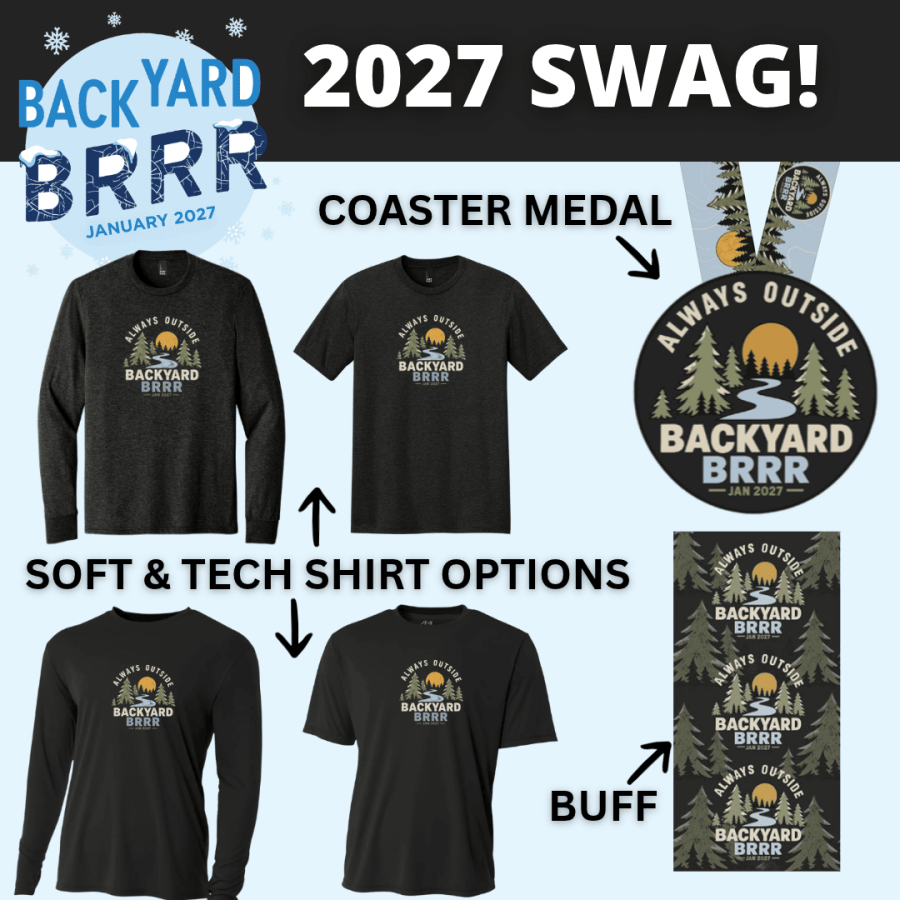
Successfully refer your friends and family using your referral link (sent in your confirmation email) and earn the following rewards:
Refer 5 people and receive a pair of EX2 running/cycling socks!
Refer 10 people and receive socks AND a refund of your entry fee!
Refer 15 people and socks AND a refund of your entry fee AND an EX2 sweatshirt.